

Skip to main content Pricing Find the right way to run compliance

Products

Compliance Officer Service Expert-led compliance, end to end Compliance Portal Share security documents securely Document Management Draft, approve, and sign your policies Employee Portal Your whole team’s compliance, in one portal Access Review Monitor user access across all your systems AI Agents Run compliance from the tools you use Cookie Banner Consent that follows every visitor's law Device Agent Continuous security posture for every device Open-source platform Deploy Probo on your own infrastructure

Resources

Customer stories How teams get compliant with Probo Blog Ideas and guidance from the Probo team Compliance Hub Practical compliance guides and free tools Love from customers What customers say about working with Probo
Overview Understand Probo and its core concepts Product Explore Probo's GRC capabilities Developers Explore GraphQL, CLI, MCP, n8n, and webhooks Deployment Probo Cloud, self-hosting, and configuration

Explore

GitHub Explore our open-source compliance tools
Changelog
Compliance Portal

Download the signed NDA from a visitor card

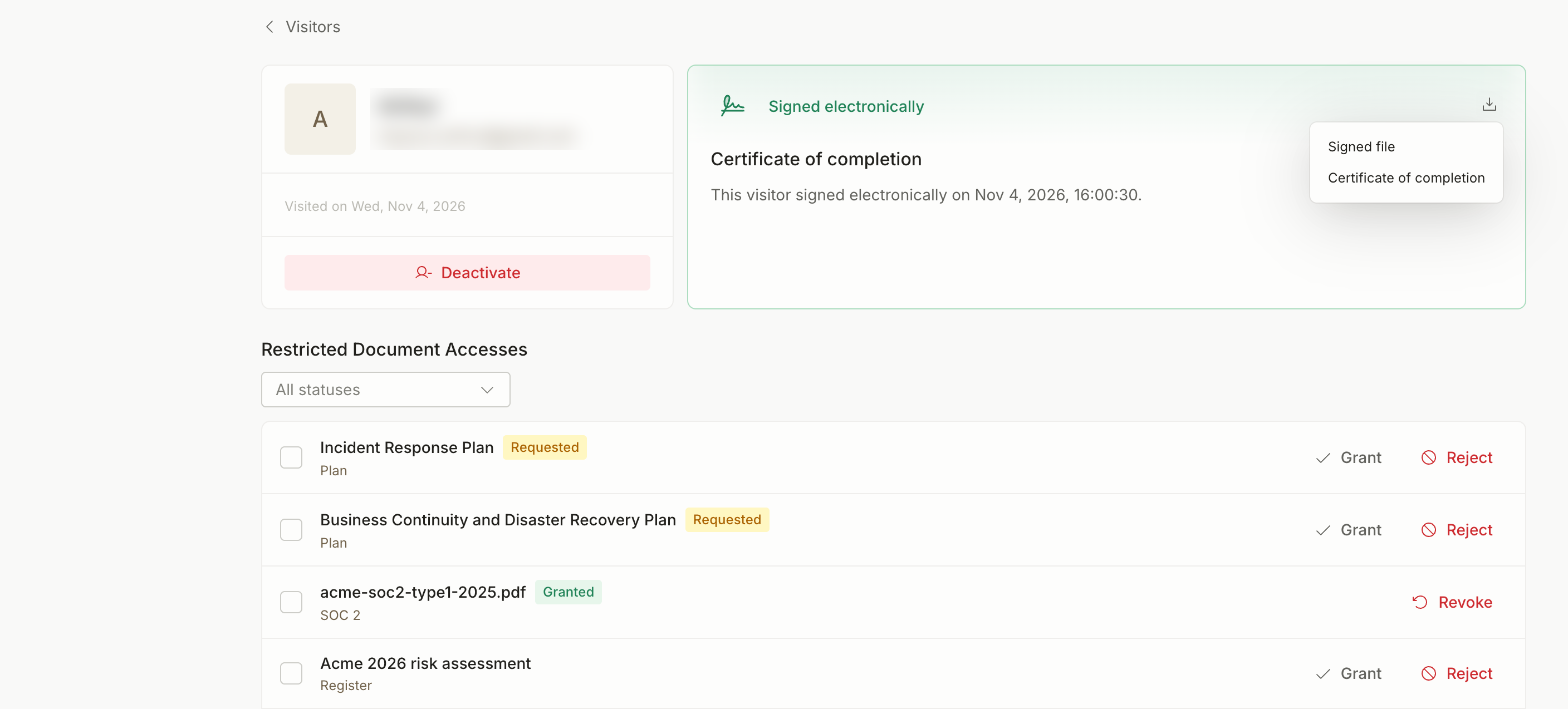
Compliance portal visitor cards now offer the document the visitor signed next to the certificate of completion. The download menu opens either file, so the signed NDA is one click away.
Download the signed NDA from a visitor card screenshot

When a visitor signs the NDA on your compliance portal, their card already gave you the certificate of completion. It now offers the signed document as well.

The download menu on the visitor card opens either file: the certificate, or the agreement exactly as the visitor signed it.

On the console GraphQL API, the ElectronicSignature type adds an nda field with the signed document.