

1Password
Connect 1Password as an access review source with an OAuth application's client credentials or a SCIM Bridge bearer token, so Probo can list the members of your 1Password account.
Probo reads your 1Password account’s members so you can review who has access. The recommended method is client credentials from a 1Password OAuth application, which Probo uses to call the 1Password Users API. 1Password does not support Users API integrations alongside automated user provisioning, so an account that uses provisioning connects through its SCIM Bridge instead, with the SCIM URL and bearer token its provisioning setup issued. Hosted Google Workspace provisioning connects through a Google service account and issues neither, so neither method applies to an account provisioned that way.
Prerequisites
Section titled “Prerequisites”Client Credentials
Section titled “Client Credentials”- Probo organization administrator access
- A 1Password Business or Enterprise Password Manager account. The Users API is not included with 1Password Teams
- Permission to manage integrations in 1Password, for example as an owner, an administrator or a member of the Security group
- No automated user provisioning on the account
- Your 1Password account ID and region, which Find Your Account ID and Region shows how to read
SCIM Bridge
Section titled “SCIM Bridge”- Probo organization administrator access
- The owner or administrator role in a 1Password Business account (automated user provisioning requires both the plan and the role)
- Automated user provisioning already in place that issued a SCIM URL and bearer token, either hosted by 1Password or on a SCIM bridge you deployed yourself
- The SCIM Bridge URL, which the connection form asks for alongside the token. Enter the bridge address with no path, as 1Password’s identity provider guides ask, for example
https://scim.example.com. Probo appends/scim/v2/Usersto it. For provisioning hosted by 1Password, the setup page shows a SCIM URL such ashttps://provisioning.1password.com/scim/v2, so drop the/scim/v2suffix and enterhttps://provisioning.1password.com
Collected Fields
Section titled “Collected Fields”Client Credentials
Section titled “Client Credentials”| Probo field | 1Password field | Notes |
|---|---|---|
| Name | display_name | |
email | A user without an email address is skipped | |
| Role | Not supported | |
| Admin | Not supported | |
| Status | state | ACTIVE is listed as active and SUSPENDED as inactive. Any other state is listed as unknown |
| MFA | Not supported | |
| Last login | Not supported | |
| External ID | id | Stable identifier used to track the account across reviews |
| Created at | create_time | When the user was created in 1Password |
1Password lists only active and suspended users, so a member who has not yet joined, is awaiting confirmation or is in account recovery does not appear in the campaign.
SCIM Bridge
Section titled “SCIM Bridge”| Probo field | 1Password field | Notes |
|---|---|---|
| Name | displayName | Falls back to name.formatted, then to name.givenName and name.familyName joined with a space |
userName | Falls back to the primary address in emails. A user with neither is skipped | |
| Role | Not supported | |
| Admin | Not supported | |
| Status | active | Listed as inactive when active is false, including when the response omits the field |
| MFA | Not supported | |
| Last login | Not supported | |
| External ID | id | Stable identifier used to track the account across reviews |
| Created at | meta.created | When the user was created in 1Password. Left empty when the value is not an RFC 3339 timestamp |
A SCIM user record has a meta.lastModified timestamp, but that timestamp records the last change to the profile rather than a sign-in, so Probo does not report it as a last login. Probo reads no role from the SCIM record either, so it flags no account as an administrator.
Connect 1Password
Section titled “Connect 1Password”Option A: Client Credentials (recommended)
Section titled “Option A: Client Credentials (recommended)”Create the OAuth Application
Section titled “Create the OAuth Application”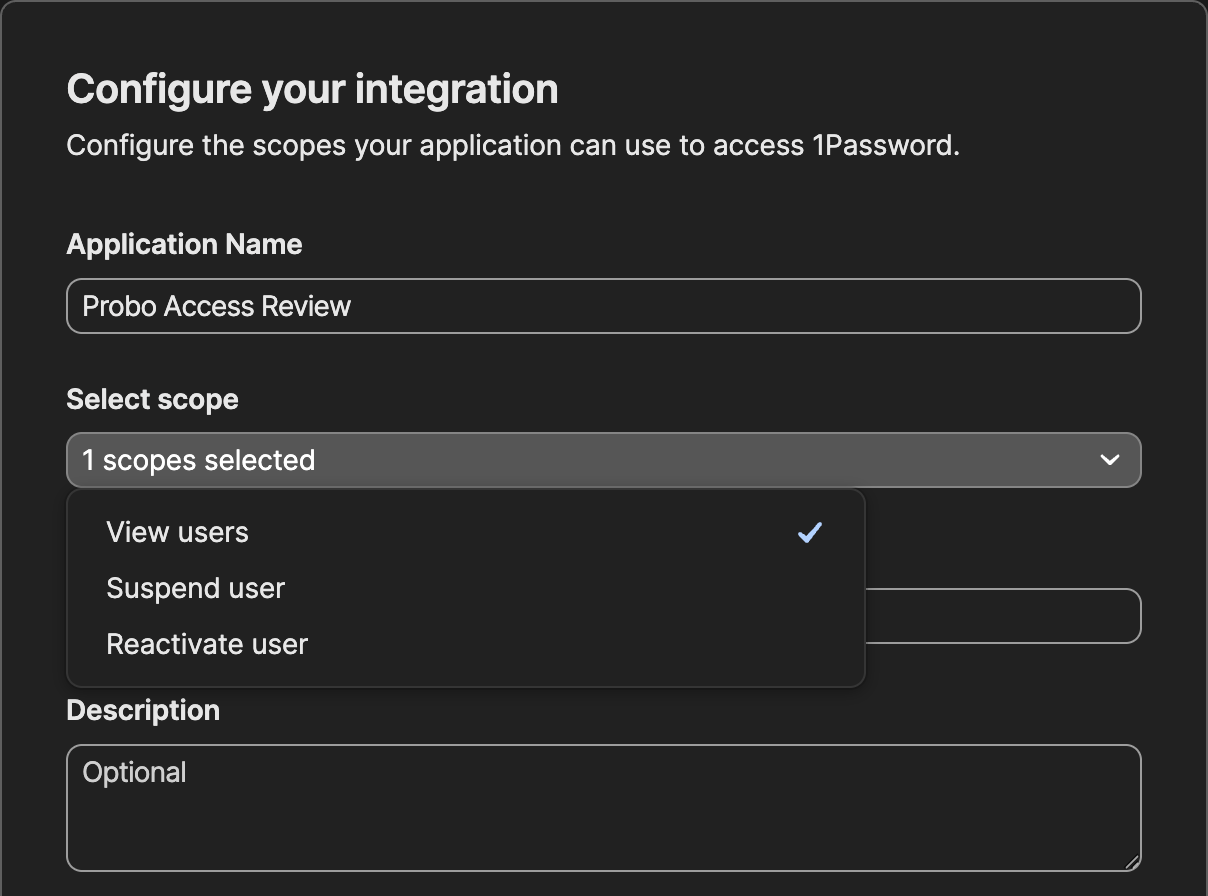
- Sign in to 1Password.com as an owner, an administrator or a member of the Security group. Select Integrations in the sidebar, open the Directory tab if 1Password shows one, and select OAuth Application. If 1Password asks for a grant type, choose Client credentials and click Next.
- Enter an Application Name, for example
Probo Access Review. - Open Select scope and tick View users. Leave Suspend user and Reactivate user unticked, since Probo only reads the user list. Scopes cannot be changed after the application is created.
- If the form shows a Redirect URL field, it is required even though the client credentials grant Probo uses never redirects, so enter any
httpsaddress, for examplehttps://www.probo.com. - Click Next, then copy the Client ID and the Client secret. 1Password shows the secret only once, so store it securely.
Find Your Account ID and Region
Section titled “Find Your Account ID and Region”- Select View vault items at the bottom of the 1Password.com sidebar. The address bar then reads
https://<sign-in address>/app#/<account ID>/AllItems. Copy your account ID, which is the 26 characters between#/and the next/. With the 1Password CLI signed in to this account,op account get --account <sign-in address>prints the same value as ID. - Read the region from the ending of the sign-in address, the host in that same address bar:
.1password.euis Europe,.1password.cais Canada,.ent.1password.comis Enterprise (ent.1password.com), and any other address ending in.1password.comis United States.
Connect in Probo
Section titled “Connect in Probo”- In Probo, go to Settings > Connectors and click Add more to open the Marketplace.
- Find 1Password and open it.
- Choose Client credentials.
- Enter a Name for the connection (e.g.
main), paste the Client ID and the Client secret, enter your Account ID, select your Region, and click Connect. - Go to Access Review > Sources, click Add sources, tick 1Password, and click Add.
Probo names the source after your account ID and pulls the account’s members into your campaigns.
Option B: SCIM Bridge
Section titled “Option B: SCIM Bridge”- In 1Password.com, signed in as an owner or administrator, select Integrations in the sidebar, open the Directory tab if 1Password shows one, then select your identity provider in the User Provisioning section.
- Complete the provisioning setup. For provisioning hosted by 1Password, select Set up hosted provisioning. For a self-hosted bridge, choose your deployment platform and follow 1Password’s deployment guide for it.
- Copy the bearer token that 1Password issues at the end of setup and store it securely. You deploy a self-hosted bridge with the
scimsessionfile that 1Password generates together with the token, so keep both. A token from another 1Password integration, such as Events Reporting, does not work. - In Probo, go to Settings > Connectors and click Add more to open the Marketplace.
- Find 1Password and open it.
- Choose API key.
- Enter a Name for the connection (e.g.
main), paste the bearer token into API key, enter your SCIM Bridge URL (the address of the bridge that token was issued for, with no path), and click Connect. - Go to Access Review > Sources, click Add sources, tick 1Password, and click Add.
Probo names the source after your SCIM Bridge URL and pulls the account’s members into your campaigns.
Troubleshooting
Section titled “Troubleshooting”Client Credentials
Section titled “Client Credentials”- Account ID rejected. Probo shows Could not connect when the account ID is not 26 letters and digits. Copy it from the address of the 1Password web app, not the sign-in address or the account name.
- The connector shows Disconnected. 1Password refused the client credentials. Confirm that the client ID and secret were copied whole, that the application still appears under Integrations > Your integrations, and that the region matches the ending of your sign-in address. 1Password serves each region from its own host, so credentials from one region are refused by the others.
- The connector shows Not authorized. 1Password accepted the client credentials but refused the user list. Either the application lacks the View users scope, or the Account ID is not your account’s, for example the client ID pasted in its place. Scopes cannot be changed, so for a missing scope create a new application with View users. In both cases, delete the source in Access Review > Sources, disconnect the connector in Settings > Connectors, and connect again.
- The client secret was rotated. After Rotate client secret on the application’s page, 1Password keeps the previous secret valid for 6 hours. Probo cannot take a new secret in place, so within that time delete the source in Access Review > Sources, disconnect the connector in Settings > Connectors, and connect again with the new secret.
- An invited member is missing. 1Password lists only active and suspended users, so a person appears once they have joined and been confirmed.
- No account is flagged as an administrator. The Users API reports no role, so Role and Admin stay empty for every member. Review who holds the owner and administrator roles in 1Password instead.
SCIM Bridge
Section titled “SCIM Bridge”- Token rejected. The bridge accepts only the bearer token paired with the
scimsessionfile it runs with, so a token from an earlier setup or from a different 1Password integration fails. Selecting Regenerate Credentials on the 1Password Integrations page issues a new pair. Deploy a self-hosted bridge with the newscimsessionfile and give the new token to your identity provider, then click Update API key (the key icon) on the 1Password connector in Settings > Connectors, paste the new token, and click Save API key. - No members appear. Probo lists the users the bridge returns on its
/scim/v2/Usersendpoint and skips any record without an email address. Confirm the bridge is healthy and that the URL you connected is the one your identity provider provisions against. - SCIM Bridge URL rejected. The URL must use
httporhttpsand include a host, for examplehttps://scim.example.com. Probo calls the bridge from its own servers, so you cannot connect a bridge that is reachable only on a private network. - No account is flagged as an administrator. Probo reads no role from the SCIM user records, so Role and Admin stay empty for every member. Review who holds the owner and administrator roles in the 1Password console instead.
- The provisioning setup is unavailable. Automated user provisioning is a 1Password Business feature, and only an owner or an administrator can set it up. On a lower plan, upgrade first.